MPC card အသစ်လဲခြင်း
MPC တစ်ခုခုက alarm တက်လာပြီဆိုရင် MOP panel မှာ alarm ရဲ့ information ကို သွားဖတ်ပြီး ဘာကြောင့် ဖြစ်နိုင်တယ်ဆို သိနိုင်ပါတယ်။ သူက ဖြစ်နိုင်ချေ ရှိတဲ့ အကြောင်းအရာတွေ အကုန်လုံးကို ရှင်းပြထားတာပါ။ Computer based controller တွေဆိုတော့ တချို့ ပြဿနာတွေ error တွေက Reset လုပ်ရင် အဆင်ပြေတတ် ပါတယ်။ EICU လို redundancy ရှိတဲ့ ကတ်တွေကို reset လုပ်တာက ဘာမှ မဖြစ်ပေမယ့် CCU, ACU တို့ကို လုပ်ရင် Engine Slow down ဖြစ်မှာမို့ သင်္ဘောက safe area ရောက်မှ လုပ်သင့်ပါတယ်။
တကယ်လို့ reset နဲ့ အဆင်မပြေဘူး၊ MPC ကတ် ပေါ်က LED က အနီရောင် (Fatal error ) ပြနေပြီဆိုရင် ကတ် လဲရပါမယ်။
ကတ်လဲမယ်ဆိုရင် ထုံးစံအတိုင်း power supply အရင် ပိတ်ရပါမယ်။ MPC ကတ်တွေအတွက် power supply cabinet က သပ်သပ်ရှိပါတယ်။ Engine Control Room မှာ ထားတတ်ပါတယ်။ power supply က နှစ်ခု ရှိနေရင် နှစ်ခုစလုံးကို ပိတ်ရပါမယ်။
Electronic PCB ကို ကိုင်တွယ်ရမှာမို့လို့ ကတ်မလဲခင်မှာ ခန္ဓာကိုယ်ကို ground ချပေးတာ ဖြစ်ဖြစ် ၊ Wrist Band တပ်တာ ဖြစ်ဖြစ် လုပ်သင့်ပါတယ်။ MPC ကတ် အသစ် လဲရတာက ရှုပ်တာခက်တာ မရှိပါဘူး။ power supply cabinet ကနေ power တွေ ပိတ်ပြီးရင် ကတ်ပေါ်က power supply plug ကို ဆွဲဖြုတ်မယ်။ Network A နဲ့ Network B plug ကို ဖြုတ်မယ်၊ ပြီးရင် ID key ကို ဖြုတ်မယ်၊ ပြီးရင် ကျန်တဲ့ plugs တွေကို ဖြုတ်ရပါမယ်။ ဖြုတ်တဲ့အခါ plug tags တွေနဲ့ position တွေကို မှတ်ထားသင့်ပါတယ်။
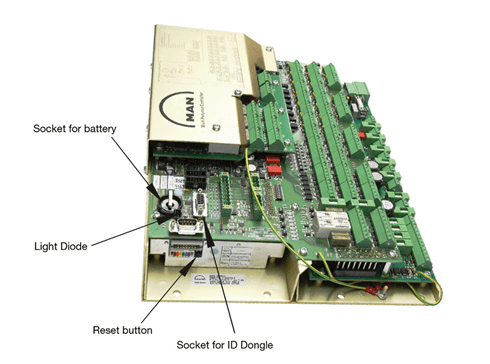
ကတ် အသစ် ပြန်တပ်တဲ့အခါ အရင်ဆုံး DIP Switch S1 နဲ့ Colored DIP switch တွေ နေရာ မှန်လား စစ်ဖို့လိုပါတယ်။ DIP Switch S1 က အကုန် OFF position မှာ ရှိရမှာ ဖြစ်ပြီး Colored DIP က အစ နဲ့ အဆုံး ခလုတ် (No.1 and No.8) က OFF ၊ ကျန်တာက ON နေရမှာပါ။ ပြီးတော့ back up battery ရှိမရှိ စစ်ရပါမယ်။ battery မပါရင် ကတ်က restart ကျတတ်ပါတယ်။ ပြီးရင် ခုနက အဆင့်တွေ ကို ပြောင်းပြန် ပြန်လုပ်ရုံပါပဲ။ plugs တွေ ပြန်တပ်၊ ID key တပ်၊ Network plugs တွေတပ်၊ ပြီးရင် power ကြိုးတပ်၊ Power ON ရပါမယ်။

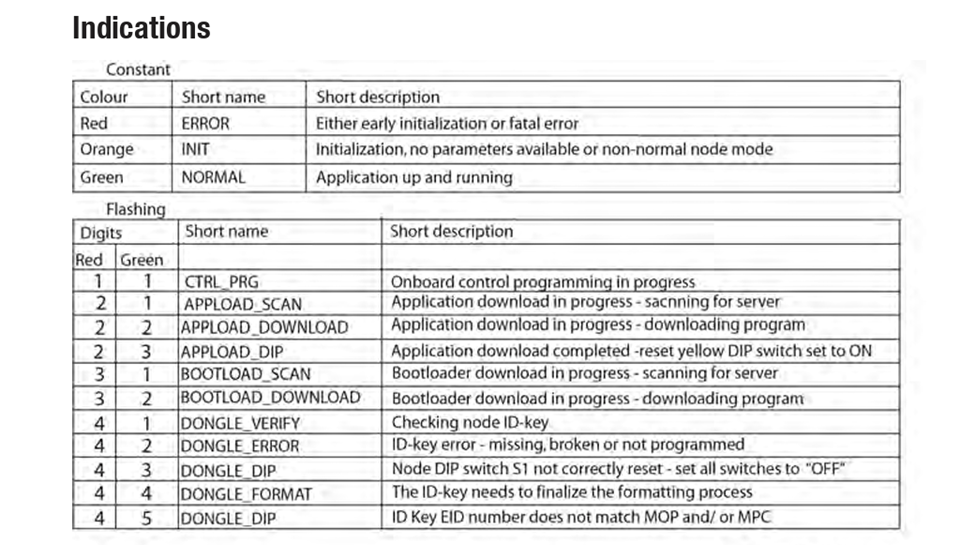
Power ပြန် ON ပြီးနောက်မှာ MPC က ID key ဆီကနေ သူ့ရဲ့ address ကို ယူပြီး MOP ဆီက သက်ဆိုင်ရာ software ကို Download ရယူမှာပါ။ ၄ မိနစ် ကနေ ၅ မိနစ် လောက် ထိ ကြာနိုင်ပါတယ်။ ကတ်က Downloading ၊ Initialization လုပ်နေတဲ့ process အခြေအနေကို LED information ကနေ သိနိုင်ပါတယ်။ Download and installing ပြီးနောက်မှာ LED က အစိမ်းရောင် ဖြစ်သွားတာ တွေ့ရပါမယ်။ MOP panel က System maintenance မှာလည်း ကတ် က စအလုပ် နေပြီဆိုတာ ကြည့်လို့ရပါတယ်။ တကယ်လို့ LED က အစိမ်းရောင် မပြောင်းသေးဘူး၊ အချိန်က အတော်ကြာနေပြီဆိုရင် Reset လုပ်ပြီး Process ကို ထပ်စ ရမှာပါ။
ကတ် အသစ်ကို ထားသိုတဲ့နေရာကလည်း အရေးကြီးပါတယ်။ အများအားဖြင့် CE ရဲ့ အခန်းမှာ ထားကြပါတယ်။ ထားခဲ့ရင်လည်း ရေမထိနိုင်တဲ့နေရာ၊ လှိုင်းလုပ်လို့ ပစ္စည်းတွေ ပြုတ်မကျနိုင်တဲ့နေရာမှာ သေချာ သိမ်းသင့်ပါ တယ်။ အကြောင်း အမျိုးမျိုးကြောင့် ကတ် အသစ်က မလဲ ခင်ကတည်းက ထိခိုက်မိပြီး ပျက်နေတယ်၊ ဒါမှမဟုတ် Spare card မရှိဘူး ဆိုရင် တခြား နေရာမှာ သုံးနေတဲ့ MPC card ကို ယူသုံးရမှာပါ။ EICU လို Redundancy ရှိတဲ့ card ကို ယူလိုရသလို TIER II Engine ဆိုရင် SCU MPC ကို ယူသုံးလို့ရပါတယ်။
အဲဒီလို တစ်နေရာမှာသုံးပြီးသား ကတ်ကို သုံးမယ်ဆိုရင် လဲရတဲ့အဆင့်တွေက ကတ်အသစ်နဲ့ လဲ တာ နဲ့ အတူတူ ပဲ ဖြစ်ပါတယ်။ ပျက်နေတဲ့ MPC ကိုဖြုတ်၊ ပြီးတော့ တခြားနေရာကနေ ပြန်သုံးမယ့် (ဥပမာ EICU) MPC ကို တပ် ၊ Power ပြန် ON တဲ့အခါ MPC ကအရင် သိနေပြီးသား address နဲ့ ID key က ပြောတဲ့ address က လွဲနေတာ MPC ကတွေ့ပါမယ်။ အဲဒီလို ဖြစ်ခဲ့ရင် ID key က address ကို ဦးစားပေးပါတယ်။ အဲ့ဒီတော့ MPC က သူ့ရဲ့ ရှိပြီးသား Program ကို ဖျက်ပြီးတော့ ID key က ပြောတဲ့ Program ကို download လုပ်မှာပါ။
MPC card Program ကို Force Download လုပ်ခြင်း
ခုပြောတာက MPC card ရဲ့ မူလရှိပြီးသား Program ကို သိပြီးသားအခြေအနေပါ။ တနေရာမှာ သုံးပြီးသား MPC ကို ပြန်သုံးမယ်၊ သူ့မှာ ဘယ် Programရှိမှန်း မသိရင်တော့ MPC ကို Install လုပ်တဲ့အခါ ID key က ပြောတဲ့ Program ကို Force Download လုပ်ခိုင်းရမှာပါ။ ခုနက MPC က သိတဲ့ address နဲ့ ID key address နဲ့မှာ ID key ကို ဦးစားပေးတယ်လို့ ပြောခဲ့ပါတယ်။ ဒါပေမယ့် MPC က Cylinder ၈ လုံးပါတဲ့ Engine က CCU 1 ဖြစ်မယ်၊ သူ့ကို ပြန်သုံးမယ့်နေရာက cylinder ၆ လုံးပါတဲ့ Engine က CCU 1 ဖြစ်နေမယ်ဆိုရင် ပြဿနာ ရှိလာပါမယ်။ ID key ကလည်း MPC ကို မင်းက CCU1 လို့ပြောမယ်၊ MPC ကလည်း CCU1 program ရှိပြီးသားဆိုတာ သိမယ်၊ အဲလိုဆိုရင် program အသစ် မသုံးတော့ဘဲ MPC က သူ့မူလ program အတိုင်းပဲ အလုပ် လုပ်တော့မှာပါ။
အဲလိုမျိုးဆိုရင် MPC ကို သူရဲ့ မူလ program ကို ဖျက်ခိုင်းရပါမယ်။ MPC ကို ဖြုတ်လဲ အဆင့်က အတူတူပါပဲ။ ကွာသွားမှာ တစ်ခုက Colored DIP switch ရဲ့ No.4 ကို ON ကနေ OFF ပြောင်းပေးရမှာပါ။ အဲဒီတော့မှ MPC က သူ့မူလ Program ကို ဖျက်မယ်။ ပြီးမှ Serverကနေ ID key ကပြောတဲ့ Program ကို download လုပ်ပါမယ်။ Download ပြီးရင် LED က အနီ ၂ ခေါက် အစိမ်း ၃ ခေါက် လင်းနေပါလိမ့်မယ်။ အဲဒီအချိန် Colored DIP switch No.4 ကို OFF ကနေ ON ပြန်ပြောင်းပေးရပါမယ်။
MPC Installation without ID key
ID key က ပျောက်တာ ပျက်တာ ဖြစ်ခဲပါတယ်။ တကယ်လို့ ID key ကို ဖြုတ်ထားတာ၊ ဒါမှမဟုတ် ID key က ပျက်သွားတာ ဖြစ်ခဲ့ရင် MPC ရဲ့ Operation ကို မထိခိုက်နိုင်ပါဘူး။ ဘာလို့လဲဆိုတော့ MPC က သူ့ Program ကို ထည့်သွင်းပြီးသားမို့လို့ ID key ကို မလိုတော့ပါဘူး။ ဒါပေမယ့် MPC ကို Reset လုပ်တာပဲ ဖြစ်ဖြစ်၊ အသစ်လဲရမှာ ပဲ ဖြစ်ဖြစ် ကြုံလာခဲ့ရင် ID key က လိုလာ ပါပြီ။
အဲ့ဒီတော့ ကတ် အသစ်လဲရမယ်၊ ID key ကလည်း မရဘူး ဆိုရင် ကတ် ကို install လုပ်လို့ရသလား ဆို တော့ ရပါတယ်။ ID key က MPC ကို address မပြောပြနိုင်တော့ MPC ရဲ့ DIP switch S1 ကနေ MPC ကို address ပေးရပါမယ်။
Address ပေးဖို့ အတွက် DIP Switch S1 ကို MPC ရဲ့ address အတိုင်း on / off နေရာချ ပေးရပါမယ်။ Engine ရဲ့ Instructions book မှာ switch setting တွေ ရှာလို့ရပါတယ်။ ပုံမှာ နမူနာ switch position table ကို ပြထားပါတယ်။
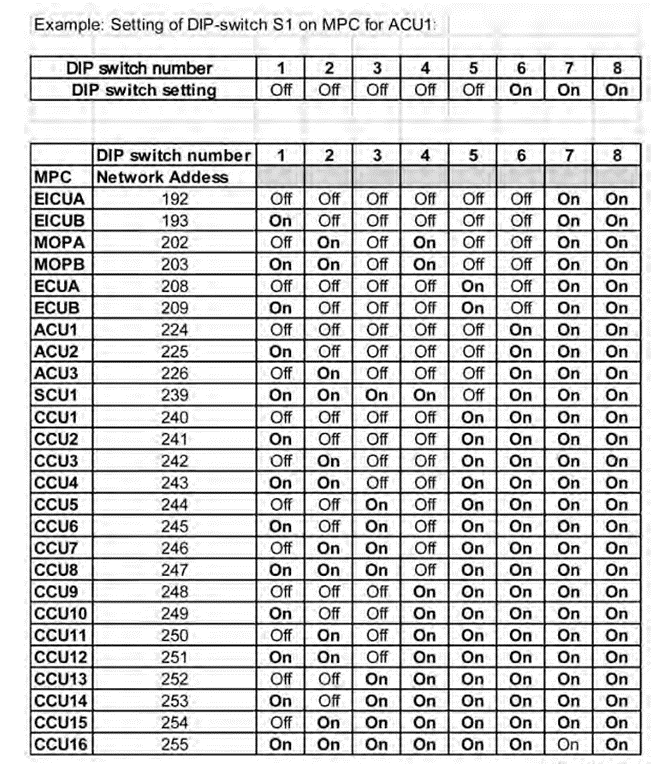
ဥပမာ ACU1 MPC ကို ID key မပါဘဲ လဲမယ်ဆိုရင် သူရဲ့ DIP switch S1 ရဲ့ Position ကို table က အတိုင်း ထားရပါမယ်။ Table မှာ ACU1 ရဲ့ switch position ကို ကြည့်ပါမယ်။ 1 ကနေ 5 အထိ OFF 6,7,8က ON ဆိုတော့ အဲ့ဒီအတိုင်း DIP switch S1 ကို ထားရုံပါပဲ။ တစ်ခုသတိထားရမှာက ခု ပြထားတဲ့ Table က Switch နံပါတ် ဘယ်လောက်က ON နံပါတ် ဘယ်လောက်က OFF ဆိုပြီး ပြပါတယ်။ တချို့ instruction book တွေမှာ on/ off နဲ့ မပြဘဲ binary number တွေနဲ့ပြထားပါတယ်။ အဲဒီ Binary number address နဲ့ MPC card DIP switch S1 sequence က ပြောင်းပြန် တွေပါ။ ဥပမာ Table မှာ ACU1 ရဲ့ address ကို binary code 11100000 လို့ ပြထားပြီး MPC card ရဲ့ DIP switch S1 မှာ 00000111 လို့ ပြောင်းပြန် set up လုပ်ရမှာပါ။ အဲဒီလို ပြောင်းပြန် set up လုပ်ရမှာ ဖြစ်ကြောင်းလည်း ဖော်ပြထားပါတယ်။ ဒါကြောင့် ကတ်ကို DIP switch S1 ကနေ address ပေးရမယ်ဆိုရင် ကိုယ့်ရဲ့ Instruction book ကို သေချာဖတ်ပြီး address က in order နဲ့ သွားတာလား reverse order နဲ့လားဆိုတာ သတိထား ရှာသင့်ပါတယ်။
DIP switch S1 ကို Manual ထဲကအတိုင်း set up လုပ်ပြီးနောက်မှာ Colored DIP switch ရဲ့ No.5 ကို OFF ပေးရမှာပါ။ ပြီးနောက် Power ON လိုက်တဲ့အခါ MPC က ID key မလိုတော့ဘဲ သူ့သက်ဆိုင်ရာ Program ကို သိပြီး Download ရယူမှာပါ။
New ID Key Programming
သင်္ဘောတွေမှာ ID key အသစ်တစ်ခုကို essential spare parts အနေနဲ့ ထားတတ်ကြပါတယ်။ ID key အသစ် ရှိရင် ID key အသစ်ကို Program ပြန် လုပ် ပြီး သုံးရမှာပါ။ ID key ကို သုံးမယ့် MPC ကနေ ပြန်ပြီး ID key ကို program ပေးတာပါ။ MPC ကို power ပိတ် ပြီးတော့ DIP switch S1 ကို ရှေ့မှာဆိုခဲ့သလို MPC card ရဲ့ address အတိုင်း set up လုပ်ရပါမယ်။ Colored DIP switch ကိုတော့ ပြောင်းစရာ မလိုပါဘူး။ ပြီးရင် MPC ကို power on ရပါမယ်။ MPC က ID key error တက်ပါမယ်။ အဲဒီအချိန် ID key ကို MPC မှာ တပ်လိုက်တဲ့အခါ MPC က ID key ကို program ရေးပေး ပါတယ်။ ပြီးသွားရင်တော့ ID key programming ပြီးသွားကြောင်း LED က အနီ လေးခါ အစိမ်းသုံးခါ ပြပါမယ်။ အဲအချိန် မှာ DIP switch S1 ကို မူလ ပုံစံပြန်ထားရမှာပါ။ LED information table ကို အောက်မှာ ပြန် ပြပေးထားပါတယ်။
ခု ပြောပြတဲ့ MPC card လဲပုံလဲနည်းတွေက ခုချိန်ထိ ကျွန်တော်သိထားသမျှပါ။ နောက်ပိုင်း procedure တွေ update ဖြစ်လာနိုင်တာ ရှိသလို Engine model တစ်ခုနဲ့တစ်ခု ကွဲရင်လည်း ကွဲနိုင်ပါတယ်။ အကောင်းဆုံးက Maker’s manual ကို reference ထားဖို့ပါ။ အရေးအကြောင်းဆို အလွယ်တကူ ရှာတွေ့အောင် MPC replacement procedure တွေကို ကြိုရှာဖွေဖတ်ထားရင် ပိုကောင်းပါတယ်။
References
1) Hyundai-Man B&W Diesel Engine Main Engine Manual Volume II
2) MAN Diesel PrimServ Academy
(This overview of ME Engine Control Systems is intended solely for educational purposes and knowledge sharing. It is not designed for commercial publication or professional use. The information provided aims to offer a general introduction to ME Engine Control Systems for those unfamiliar with the topic.
Please be aware that this overview is based on specific ME engines encountered and reflects current technology as of the date of writing. Due to the evolving nature of technology, there may be gaps, discrepancies, or inaccuracies in the information presented.
For the most accurate and up-to-date information, further research and consultation with industry experts are recommended. Corrections, additional insights, and feedback from the community are welcome to enhance the accuracy and usefulness of this material.)
 ETO Insights
Leave a comment